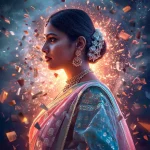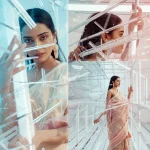


Discover how to master soft lighting and artistic shadows in AI portraiture with these ten highly creative and atmospheric prompts for elegant women.
In professional portrait photography, lighting is everything. The way light wraps around a subject and the shapes of the shadows cast across their features can transform a simple picture into a powerful, emotional narrative. With the advent of advanced AI image generators, digital artists can now recreate these complex lighting setups—such as volumetric dust motes, glowing underwater coral, and neon rain reflections—using carefully crafted text prompts that emphasize cinematic atmosphere and artistic shadow play.
This article presents ten premium AI prompts designed to generate elegant women's portraits with soft lighting and artistic shadows. These prompts span a wide array of imaginative settings, including a cozy, trendy cafe, a melancholic abandoned mansion, a magical sunken city, and a futuristic cyberpunk street. Each prompt is structured to guide the AI in rendering delicate skin textures, detailed garments, and complex environmental lighting that feels incredibly realistic and high-end.
By learning how to manipulate light sources, atmospheric effects, and camera lenses within your prompts, you can create portraits that look like they were shot by a world-class photographer. Let us dive into the technical aspects of these prompts and explore how you can use them to produce stunning, gallery-quality digital art on platforms such as Midjourney, Flux, Gemini, and Leonardo AI.
What Are Elegant Women's Portraits with Soft Lighting and Artistic Shadows?
Elegant Women's Portraits with Soft Lighting and Artistic Shadows refers to a style of digital portraiture that prioritizes mood, depth, and lighting over flat, highly saturated visuals. This aesthetic focuses on the delicate interplay between light and dark (often referred to in classical art as chiaroscuro). Instead of uniform, bright studio lighting, these portraits utilize localized, atmospheric light sources—such as a single lamp on a library desk, sunlight streaming through a dusty window, or the neon glow of rain-slicked streets.
The "artistic shadows" element is crucial. Shadows are not merely empty black spaces; they are used to frame the subject's face, highlight bone structure, and create a sense of mystery and introspection. Combined with elegant garments like vintage lace gowns, iridescent ice dresses, or flowing rose-petal fabrics, this lighting style produces a sophisticated, painterly effect that elevates the final image from a simple digital render to a timeless work of art.
Why Elegant Women's Portraits with Soft Lighting and Artistic Shadows Is Trending
The trend toward moody, atmospheric portraiture is driven by a collective desire for more authentic, narrative-driven digital content. On platforms like Instagram and VSCO, creators and influencers are moving away from harsh, overexposed photos in favor of soft, warm, and cinematic aesthetics. These images evoke feelings of nostalgia, calm, and mystery, which naturally encourage viewers to pause and engage with the content on a deeper emotional level.
From a technical standpoint, soft lighting and complex shadow rendering are excellent indicators of high-quality AI models. Generating realistic dust motes dancing in light shafts, or the complex refraction of light through levitating crystal spheres, showcases the state-of-the-art capabilities of modern image generators. Designers and digital artists use these prompts to push the limits of AI, creating incredibly detailed portfolios that stand out in a highly competitive digital marketplace.
Popular Styles You Can Create
This collection of prompts offers a rich variety of artistic sub-genres. For a grounded, lifestyle aesthetic, the Stylish Fashion Blogger style captures a candid, elegant moment in a trendy cafe, emphasizing soft, natural light and flawless skin textures. If you are drawn to historical romance and mystery, the Abandoned Mansion style uses crumbling wallpapers, vintage gowns, and dramatic light rays to create a beautiful, melancholic atmosphere.
For fantasy lovers, the Sunken City and Glimmering Ice Palace prompts transport your subjects to magical realms filled with glowing coral, marine life, crystal arches, and frozen waterfalls. You can also explore abstract and conceptual art with the Geometric Crystal Sphere and Suspended Time Crystal Cascade prompts, which surround the subject with levitating prisms and temporal traps. Finally, the Cyberpunk Neon Rain Dancer and Liquid Rose Petal Gown prompts offer high-energy, futuristic, and highly theatrical options for bold visual statements.
How to Use Elegant Women's Portraits with Soft Lighting and Artistic Shadows
To successfully generate these portraits, you must pay close attention to the descriptive lighting terms within the prompts. When inputting these prompts into tools like Midjourney, Flux, or Leonardo AI, avoid removing atmospheric keywords like "shafts of light," "glowing coral," "neon rain," or "ambient warm light." These words tell the AI's rendering engine exactly where to place the light sources and how to calculate the resulting shadows.
Additionally, you can customize these prompts to create a cohesive series of images. For example, you can keep the lighting and setting of the "Abandoned Mansion" prompt but change the subject's dress from a "vintage gown" to a "modern velvet slip dress," or change the color palette of the "Cyberpunk Neon Rain" prompt to match your brand's specific color scheme. This allows for endless creative variations while maintaining a consistent, high-quality photographic style.
- Choose your target AI platform (e.g., Midjourney, Flux, or Leonardo AI).
- Copy one of our detailed, lighting-focused prompts from the list below.
- Adjust the clothing style or color to match your specific artistic preferences.
- Modify the environmental light source if desired (e.g., change "sunlit window" to "moonlit window").
- Add technical parameters like aspect ratio (e.g., --ar 4:5 for portraits or --ar 16:9 for landscape banners).
- Run the prompt and evaluate the shadow placement and facial expressions in the generated grid.
- Select the best image and use an upscaler to enhance the fine details of the light rays, dust motes, and skin textures.
What Kind of Base Photo Works Best?
When using an image-to-image workflow to apply these beautiful lighting styles to a specific face, selecting the right base photo is vital. The base photo should have soft, diffused lighting rather than harsh, direct sunlight or flat flash photography. This makes it much easier for the AI to blend the existing facial features with the complex, moody shadows of the target environment.
Additionally, pay attention to the model's head angle and gaze. If you are generating a portrait like the "Enigmatic Gaze" or the "Wistful Expression" in the abandoned mansion, your base photo should feature a similar, thoughtful expression. Avoid using photos where the subject is looking away at an extreme angle, as this can lead to perspective distortions and unnatural facial mapping in the final AI-generated render.
Which AI Tools Deliver the Best Results?
Achieving realistic soft lighting and artistic shadows requires an AI image generator with advanced volumetric lighting capabilities. Below, we compare how the leading AI tools perform when handling these highly atmospheric and detailed portrait prompts.
| AI Tool | Best For | Key Strength |
|---|---|---|
| Midjourney | Cinematic Lighting & Atmosphere | Unmatched ability to render realistic light rays, dust motes, and complex shadow patterns. |
| Flux | Photorealistic Textures & Skin | Excellent at maintaining realistic skin textures and natural hand poses under soft lighting. |
| Leonardo AI | Custom Lighting Control | Provides powerful fine-tuning sliders that allow you to adjust contrast and shadow depth. |
| Gemini / ChatGPT | Prompt Customization | Great for rewriting prompts to add specific lighting gear terminology or changing background details. |
Pro Tips
To elevate your portraits to a professional gallery standard, incorporate specific camera lens descriptors into your prompts. Phrases like "85mm lens effect," "shallow depth of field," and "RAW photo" instruct the AI to mimic the behavior of a high-end DSLR camera. This results in a beautifully blurred background (bokeh) that naturally draws the viewer's eye directly to the subject's face and the delicate play of light across her features.
Another excellent technique is to use rich, tactile fabric descriptions. Describing materials like "shimmering iridescent gown," "pastel pink trench coat," or "flowing molten rose petals" gives the light something complex to interact with. The AI will calculate how the soft light reflects off these different surfaces, creating beautiful highlights and deep, rich shadows that add immense depth and realism to the overall composition.
- Cafe Blogger: Pastel pink trench coat, white blouse, sipping a latte, designer handbag, soft inviting smile.
- Abandoned Mansion: Vintage gown, dust motes dancing in shafts of light, crumbling wallpapers, broken window, wistful expression.
- Sunken City: Mermaid-like gown, glowing coral, ancient ruins, exotic marine life, underwater ambient lighting.
- Ice Palace: Iridescent gown shimmering like ice, crystal arches, frozen waterfalls, glistening columns, cool sparkling light.
- Geometric Crystal Sphere: Structured gown, levitating faceted crystal spheres, geometric light patterns, high-fashion reflections.
- Cyberpunk Neon Rain: Sleek futuristic outfit, glowing neon rain, wet surfaces, intense close-up with neon streaks.
Common Issues and Quick Fixes
Generating images with complex shadow play and atmospheric effects can sometimes lead to unexpected visual glitches. The AI may occasionally create muddy shadows that obscure important facial details, or it might render light rays that look unnatural or painted on. Understanding how to quickly identify and fix these common issues will help you maintain a high standard of quality in your digital art.
| Common Issue | Root Cause | Quick Fix |
|---|---|---|
| Overly Dark or Muddy Shadows | The AI is over-emphasizing the shadow keywords, reducing facial visibility. | Add 'fill light', 'soft ambient glow', or 'subtle face illumination' to the prompt to balance the shadows. |
| Unnatural Light Ray Angles | Conflicting light sources in the prompt (e.g., sunlit window and neon rain). | Ensure your prompt specifies a single, dominant light source (e.g., 'a single task light' or 'natural light streaming in'). |
| Blurry or Out-of-Focus Details | The 'shallow depth of field' instruction is too strong, blurring the subject. | Slightly reduce the camera weight or specify 'sharp focus on the subject's face and eyes' in your prompt. |
Frequently Asked Questions
How do I control the intensity of the artistic shadows?
You can adjust shadow depth by adding lighting terms like 'chiaroscuro', 'dramatic light rays', 'high-contrast moody lighting', or 'soft volumetric glow' to your prompt text.
Can I use these prompts to generate modern everyday fashion?
Yes, prompts like the 'Stylish Fashion Blogger' generate highly realistic, contemporary outfits like pastel trench coats and designer handbags in casual urban settings like cafes.
Which AI tool is best for rendering the wet cyberpunk neon look?
Midjourney and Flux are exceptional at rendering wet surfaces, neon light reflections, and rain streaks, creating a highly realistic, atmospheric cyberpunk aesthetic.
Conclusion
Mastering the use of soft lighting and artistic shadows is a powerful way to bring depth, emotion, and cinematic realism to your AI-generated portraits of elegant women. By utilizing these ten meticulously designed prompts and understanding how to adjust atmospheric light sources, camera lenses, and fabric textures, you can create breathtaking digital art that rivals professional studio photography. Start experimenting with these templates on your favorite AI platform today and watch your creative vision come to life.